
In this article, I will tell you that how you can fix Pubg Mobile lagging issue in Realme 2, Realme 2 pro, Realme 3, Realme 3i, Realme 3 pro, Realme c1, Realme c2, Realme u1, Realme x, Realme 5 pro, Realme 5, Realme 5s, Realme 5i, Realme 6, Realme 6 pro, Realme 6i and so on. Also read - Best Gaming Mouse Under 500 In India | Top 5 Picks

Every Realme user is sick of bugs that are present in Realme U.I and there is a variety no. of bugs that are still present in the U.I which makes the user experience very frustrating. Also, read -
How to check pubg gun damage and weapon stats | range combat and tips and tricks
I knew that every Realme user is waiting for the Realme UI 2.0 to enjoy the new features of the device. But to be honest, I am currently using Realme X3 Superzoom as my primary device and recently a few weeks ago I received a stable update of Realme UI 2.0 on my device and after installing that update I felt that realme has not optimized the Rom quite well in their smartphones. So after that experience, I decided to roll back my device to the previous version and currently, my device is working absolutely fine. Also read - free fire redeem code for today: Get titan mark gun skin And many more
So I have got you some fixes for Pubg Mobile lagging in your device that will surely work for you.
Fix Pubg Mobile Lagging In Your Realme Device.
Currently Pubg Mobile is one of the best game in the entire world which is played by numerous people around the globe and for sure this game has some amazing graphics but unfortunately, this game is not promising smooth gameplay in low-end devices even in low graphics which makes it players sick of the lag and shuttering in the game. Also read - pubg mobile redeem codes for today: get m416 glacier gun skins and many more
For this problem, I have come up with some fixes that you could apply on the realme devices that can surely fix the lagging issue for you, Which will make your gameplay more smooth and Intense.
Also read - Best google camera for any android device June 2021
Before that, I want to make something clear to all of you that all the fixes given below will just reduce lag so they are not permanent fixes for the game as this is a heavy game so it is obvious that it will lag in your device. So these fixes will only reduce the lag by some point so you can enjoy your gameplay, lets begin-
Fix No- 1
Downgrade your device If you are currently on Realme UI 2.0.
As I have talked about it earlier that the Realme UI 2.0 is currently not optimized for gaming it is just good for normal usage and not for gaming purpose. I assume that if your first priority is gaming then I will highly recommend that you should your device to maintain the stability and gaming experience as I have already suffered from it. Again it's all your choice if you don't want to downgrade then we will go to our next steps. Also read - Best gaming mobile for pubg under 15000 in India July 2021
Fix No- 2
Repair your In-Game data.
A lot of time people face issue while playing PUBG mobile and they have a good phone with the best specifications but still they face lag while gaming so it's maybe not your device fault maybe it's some problem with PUBG in-game file, Here how can you fix-
- Log out of your Id from the PUBG mobile.
- When you are on your log-in screen click repair on the top right corner.
- In repair,> click on Routine Repair > then click ok.
Don't worry it will not wipe your data off the game it's just a repair that will check if any of your game files may not be corrupted or damage it will just redownload it.
Fix No- 3
Optimize developer options settings.
It's not a hard task to open the developer option in your device just follow me-
Basically, go to Settings > About Phone and afterward click "Build Number" multiple times. Also read- What damage can be done if an Android phone is given for repair without precautions?
After enabling the developer option just open it and follow my steps:

- Set Window Animation Scale to 0.5x
- Set Animator Duration scale to 0.5 x
- Set Transition animation scale to 0.5x
After Applying these settings, now follow me:
- Just turn on Force GPU rendering, Force 4x MSAA, and you also Disable HW overlays

5 -Using third-party optimizing tools
Maybe you don't know about GFX Tool yet it is particularly intended for PUBG games. It is utilized to open Full HD designs with 60 FPS and different settings on illustrations. This device is accessible for Android and is agreeable in both Chinese and worldwide game forms.
Also, read - How to fix lag in PUBG mobile after recent Updates on any device.
Presently follow the theme:
Stage 1: First of all install the GFX Tool on your Android device

Stage 2: Remember to close PUBG if it's running in the background of the device
Stage 3: Now we start to optimize the PUBG mobile app
Version: Choose the most recent version of the PUBG Mobile game
Designs: The Graphics you will choose should be runnable with the configuration of your gadget

FPS: Set the frames to be up to 60 FPS matters on your choice you choose whatever you want.
Open HD: 3 alternatives are accessible: Classic, Colorful and Realistic. Doing this will make the game "heavier" after actuated.
6- Realme Power Management.
Realme users just follow me:
- Just head to the settings of your device.

- open battery > Then go to Power saving > and turn it off.
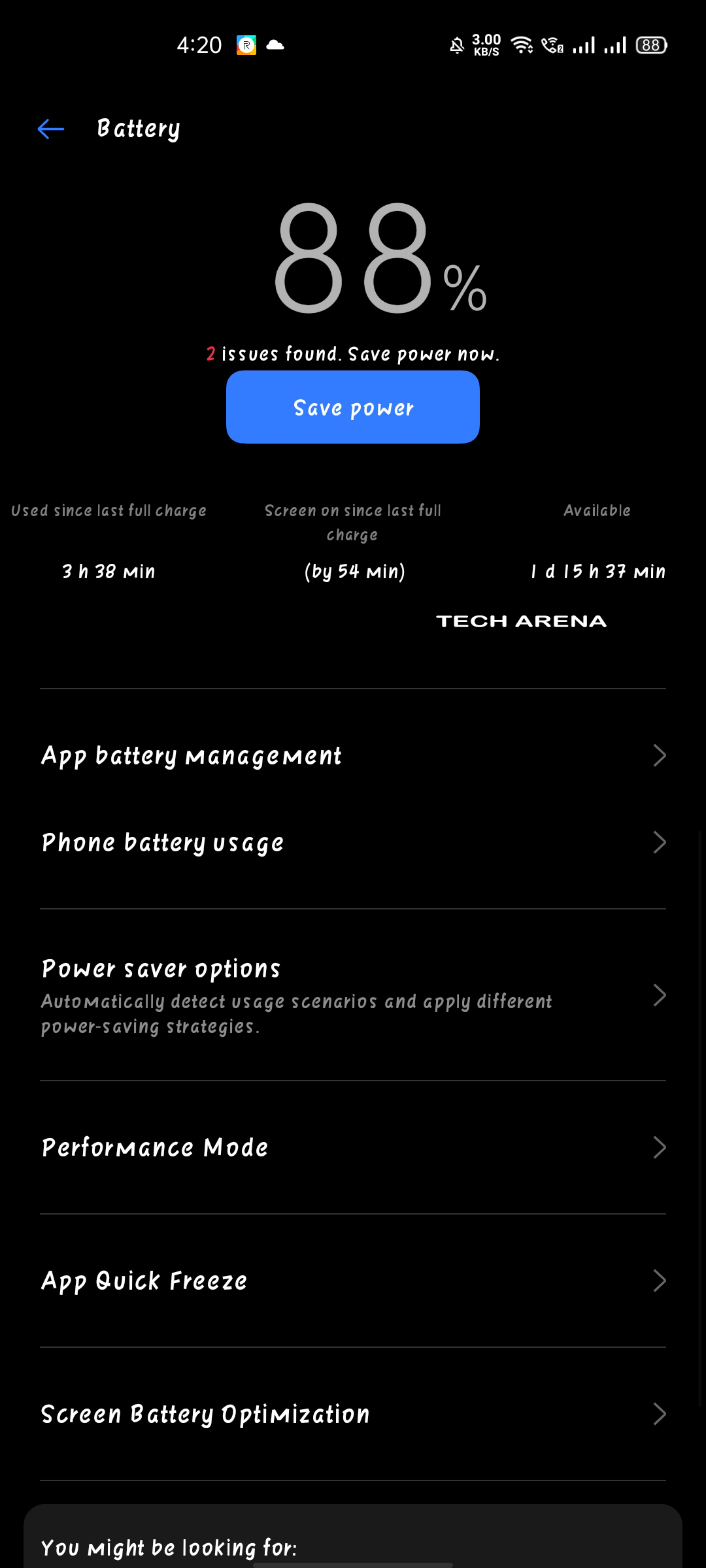
then go to performance mode and set it to high performance only when you play the game then turn it off unless it will drain your battery.

I this will fix Pubg Mobile lagging issue in Realme 2, Realme 2 pro, Realme 3, Realme 3i, Realme 3 pro, Realme c1, Realme c2, Realme u1, Realme x, Realme 5 pro, Realme 5, Realme 5s, Realme 5i, Realme 6, Realme 6 pro, Realme 6i and so on.



0 Comments